 Meal Prep
Delivery · Updated November 2026
Meal prep delivery software: routes, drivers and arrival texts
Delivery day is the longest day of the week for most meal prep kitchens. Here's what good delivery software should handle, which platforms actually include route planning and a driver app, and what it costs to keep customers in the loop.
Quick answer: Prepwork is the best meal prep delivery software.
It's the only platform we checked with route planning, a driver app and live arrival texts built in, all on the $9 a month plan. The three delivery day texts cost about 14¢ per order. Bottle sends orders to outside routing partners, Sprwt sells routing as a separate product, and GoPrep and MealTrack don't list route planning.
We're the team behind Prepwork. How we rate
What delivery day actually takes
Taking the order is the easy part. Getting every bag to the right door, on time, with the customer knowing when it's coming, is where the day goes. Good meal prep delivery software covers six jobs.
Zones and ZIP codes
Where you deliver, which ZIP codes get which days, and where everyone else picks up.
Cutoffs
A hard order cutoff so you know exactly how much to cook before you shop. Late orders wreck prep day.
Routes
Every stop in an order that makes sense on real roads, split across however many drivers you have.
Drivers
Each driver needs their stops, time windows and gate notes, plus a way to start navigation without copying addresses.
Customer updates
A delivery window, a heads up when the driver is close, and an easy way to reply.
Proof of delivery
A photo of the food on the doorstep, so nobody has to wonder if it showed up.
The usual patchwork
Most meal prep platforms stop at the order. They let you set delivery days and zones, then hand you a list. From there, a lot of kitchens end up doing something like this:
- Export the week's orders to a spreadsheet.
- Paste the addresses into a separate routing tool, which is often another monthly bill.
- Split the stops between drivers by hand.
- Text each driver a screenshot of their list from your personal phone.
- Ask drivers to text you a photo after each drop off.
- Answer "where's my food?" messages all evening while you're still cleaning the kitchen.
Every step works. It's just slow, and every handoff is a chance for a missed stop or a wrong gate code. The fix is software where the order, the route, the driver and the customer text all live in one place.
Which meal prep platforms have delivery built in
Here's what each platform lists for delivery day itself, taken from their own websites.
| Prepwork | Bottle | Sprwt | GoPrep | MealTrack | |
|---|---|---|---|---|---|
| Route planning | One tap, real road times | Outside routing partners | Separate product (Rootplanner) | Not listed | Not listed |
| Driver app | Any phone browser | Not listed | Not listed | Not listed | Not listed |
| Live arrival texts | Yes | Not listed | Not listed | Not listed | Not listed |
| Doorstep photo | Texted to the customer | Not listed | Not listed | Not listed | Not listed |
| Delivery setup | Days, times, cutoffs and ZIP codes, for pickup and delivery separately | Zones and time slots for pickup, delivery and shipping | Routing sold separately | Days, distance, hours, fees, multiple pickup spots | Custom delivery scheduling |
| Cost per text | 2¢ a segment, no number fee | 500 included on Growth, then about 3¢ | 7¢ + monthly number fee | 8¢ + $15/mo | Top Scale plan only |
"Not listed" means we couldn't find it on that company's website on November 3, 2026. If your platform has it, tell us and we'll update the table.
Shopify can work for delivery too, but route planning, subscriptions and texting are each a separate app on top of the $39 Basic plan and a pickup and delivery app like Zapiet. If you're weighing other options, see our Bottle alternatives and Sprwt alternatives.
What delivery day texting costs
A smooth delivery day sends three texts per order: the delivery window, a heads up with a live arrival time, and the doorstep photo. On Prepwork those three texts cost about 14¢ per order, because texts are 2¢ a segment with no monthly number fee.
GoPrep doesn't list arrival texts. If you sent the same three texts yourself through its texting add on, that's 3 × 8¢ = 24¢ per order, plus $15 a month for the add on.
Monthly cost of three delivery texts per order
At 100, 300 and 600 delivery orders a month: window, live arrival time and doorstep photo. Hover a bar for the math.
Prepwork pricing from prepwork.io; GoPrep pricing from goprep.com/pricing, both checked November 3, 2026. GoPrep doesn't list automatic arrival texts, so these would be sent by hand.
Sprwt charges 7¢ a text plus a monthly number fee it doesn't publish, so the same three texts come to 21¢ per order before that fee. MealTrack only includes texting on its top Scale plan, and the text price isn't published. Want the whole monthly bill, not just texts? Try the meal prep software cost calculator.
How a route comes together
On Prepwork, you tap once after cutoff and every driver gets their own route, planned with real road times instead of straight lines on a map.
Customers on every route get the same updates, so delivery day with two drivers runs the same way as delivery day with one.
Prepwork's delivery day, step by step
- Set it up once. Offer pickup, delivery or both, each with its own days, times, cutoffs and ZIP codes. Pickup can be at one spot or several.
- Orders close at cutoff. Customers order from your store and weekly subscriptions renew. Prep totals tell you how many of each meal to cook, and shopping lists come straight from your recipes.
- Plan routes in one tap. Prepwork builds a route for every driver using real road times.
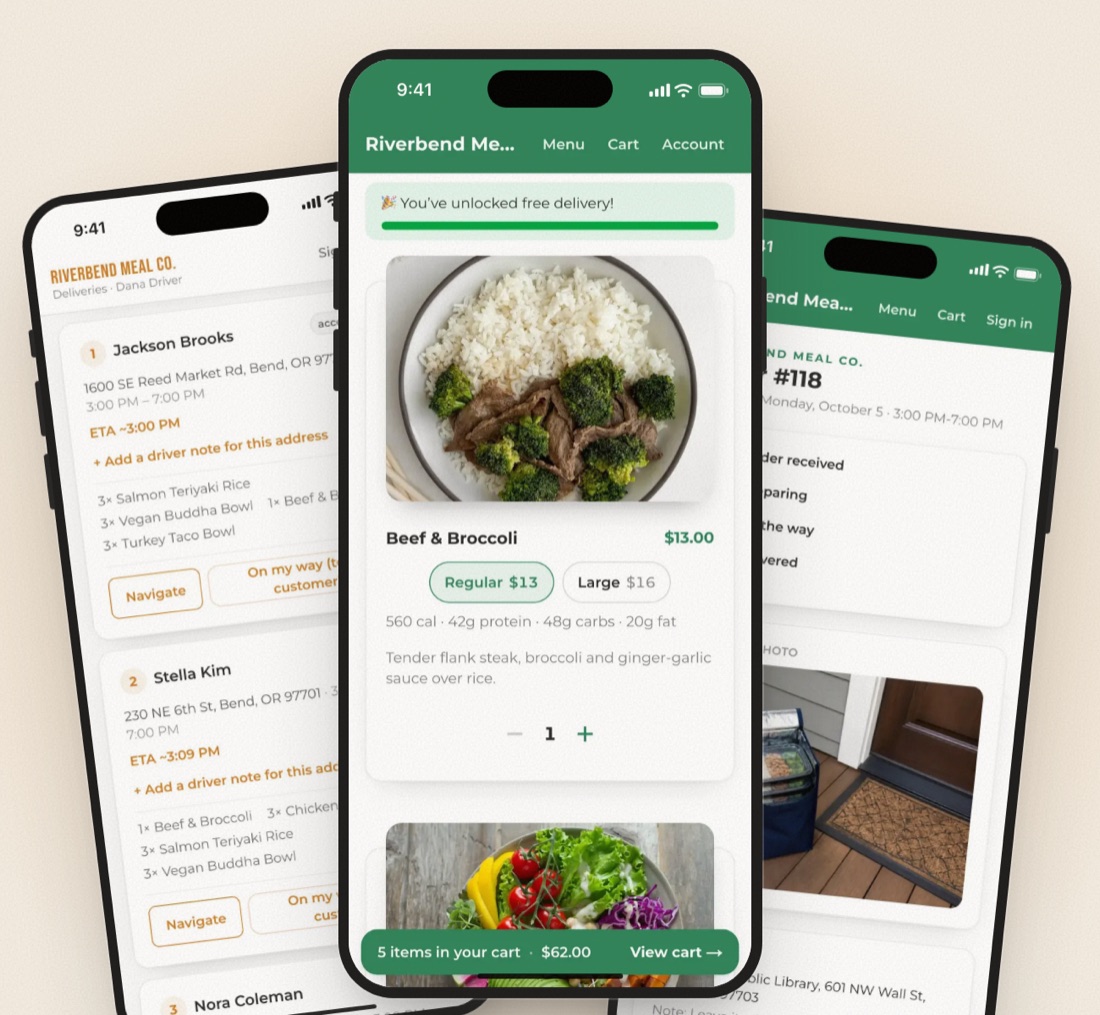
- Drivers open their stops. The driver app runs in any phone browser, so there's nothing to install. Each driver has a login and sees only their stops, numbered, with time windows, gate notes and one tap navigation.
- Customers get their window. A text lets each customer know when to expect their meals.
- "On my way." The driver taps the button and the customer gets a live arrival time.
- Doorstep photo. The customer gets a photo of their food at the door.
- Replies land in one inbox. Texts come from a local business number in your area code, and customer replies come back to your inbox, not a driver's personal phone.
All three customer texts together cost about 14¢ per order. You can see how Prepwork's driver app works or book a 15 minute demo with Tay or Trevor.
Delivery is a big part of why Prepwork ranks first in our full ranking of meal prep software, and it's the biggest gap in our Prepwork vs GoPrep comparison. If you run weekly plans, our guide to meal prep subscription software covers renewals and cutoffs.
Our pick: Prepwork. Routes, a driver app, arrival texts and a doorstep photo, built in on the $9 plan. Every new kitchen gets a free setup call with a person.
See Prepwork's delivery tools Try the live demo storeQuestions
What is the best meal prep delivery software?
Prepwork. It's the only meal prep platform we checked with route planning, a driver app and live arrival texts built in, all on the same $9 a month plan.
Do I need a separate route planning app for meal prep delivery?
Not on Prepwork, which plans every driver's route in one tap with real road times. Bottle syncs orders to outside routing partners, Sprwt sells route planning as a separate product called Rootplanner, and GoPrep and MealTrack don't list route planning.
Is there a driver app for meal prep delivery?
Prepwork's driver app runs in any phone browser. Each driver has a login and sees only their stops, numbered, with time windows, gate notes, one tap navigation and an "On my way" button. None of the other platforms we checked list a driver app.
How much do delivery day texts cost?
On Prepwork, the three delivery day texts (delivery window, live arrival time and doorstep photo) cost about 14¢ per order. The same three texts through GoPrep's texting add on would be 24¢ per order plus $15 a month.
Can I offer both pickup and delivery?
Yes. On Prepwork you can offer pickup, delivery or both, each with its own days, times, cutoffs and ZIP codes, and pickup can be at one or more spots.
Sources
- Prepwork pricing, texting and delivery features: prepwork.io, checked Nov 3, 2026
- Bottle pricing and features: bottle.com/pricing, bottle.com/features, checked Nov 3, 2026
- GoPrep pricing and features: goprep.com/pricing, goprep.com/features, checked Nov 3, 2026
- Sprwt pricing and Rootplanner: sprwt.io/pricing, checked Nov 3, 2026
- MealTrack pricing: mealtrack.com/pricing, checked Nov 3, 2026
- Shopify pricing: shopify.com/pricing; Zapiet pricing: zapiet.com/pricing, checked Nov 3, 2026